

If you’re planning a journey to China in 2026—whether for business, culture, food, or a long-awaited adventure—there’s one thing you need to prepare for just as carefully as your visa or your flight: the internet.
China is dazzling, dynamic, and incredibly advanced. But digitally, it operates on a different system. The infrastructure known globally as the “Great Firewall” filters and blocks most Western services—Google, Gmail, Instagram, Facebook, X, WhatsApp, and many international news outlets. If you land in Beijing or Shanghai assuming you can simply open Google Maps to find your hotel, you may find yourself staring at a loading screen instead.
We’ve seen seasoned, confident travelers completely thrown off by this. And we don’t want that to happen to you.
Let’s walk through this calmly and strategically, so when you step off the plane, you feel prepared, not panicked.
Understanding the Digital Landscapes
China’s internet isn’t “broken.” It’s just different. The filtering system monitors cross-border traffic using deep packet inspection and IP filtering. What that means for you in practical terms is simple: Google services don’t work. Most Western social media doesn’t work. Gmail doesn’t work.
Instead, China runs on a powerful ecosystem of local platforms, especially WeChat and Alipay. These are not just messaging or payment apps, they are entire digital worlds. Payments, bookings, food delivery, ride-hailing, messaging, banking… it’s all inside.
But here’s the key technical insight many travelers don’t realize:
If your data connection originates from outside China, through international roaming or certain eSIM providers, your traffic is routed internationally. That often allows you to bypass local restrictions without using a VPN.
That single detail changes everything.
Option 1: International Roaming — The Easiest Path
If you value simplicity and keeping your home number for two-factor authentication (bank logins, corporate systems, etc.), roaming is the least stressful solution.
For American travelers, plans like AT&T International Day Pass, Verizon TravelPass, T-Mobile International Pass, and Google Fi’s Unlimited Plus are essentially plug-and-play. You land, your phone connects, and everything works. Google, Instagram and Gmail without needing a VPN.
| Carrier | Primary International Plan | Cost Structure | Data and Voice Allowance |
|---|---|---|---|
| AT&T | International Day Pass | U$12/day (primary line), U$6/day (additional) | Unlimited data, calls, and texts based on domestic plan |
| Verizon | TravelPass | U$12/day per line | 5GB high-speed data, then 3G speeds; unlimited talk/text |
| T-Mobile | International Pass | U$5/day, U$35/10-day, U$50/30-day | 512MB, 5GB, or 15GB high-speed data respectively |
| Google Fi | Unlimited Plus | Included in U$65/month plan | Unlimited data and texting in 200+ destinations |
UK travelers face a more fragmented post-Brexit roaming structure, and China typically falls into the highest pricing tier. O2 Travel offers unlimited data but speed-capped. Vodafone and EE offer multi-day or monthly passes, but costs can accumulate quickly.
| Carrier | Recommended Roaming Option | Cost | Functional Details |
|---|---|---|---|
| EE | Roam Abroad Pass | £25/month | Allows use of UK allowance in 47 EU and 5 worldwide zones |
| EE | Travel Data Pass | £6.27/day | 500MB daily data allowance |
| Vodafone UK | Global Roam / Zone D | £7.86/day | Access to UK allowance up to 25GB fair use cap |
| O2 | O2 Travel | £7/day | Unlimited minutes, texts, and data (speed capped at 2Mbps) |
| Three | Go Roam Around the World | £5-£7/day | Access to UK allowance with 12GB monthly cap |
Australians are in a surprisingly strong position. Vodafone Australia’s $5 roaming plan and Optus’s $5 daily roaming (with generous data) are some of the most traveler-friendly options globally. If you’re already on one of these networks, roaming may be your most effortless solution.
| Carrier | Roaming Plan Name | Daily Fee | Data and Communication Allowance |
|---|---|---|---|
| Vodafone AU | $5 Roaming | $5 AUD/day | Uses domestic plan data, calls, and texts |
| Optus | Daily Roaming | $5 AUD/day | 5GB of high-speed data per 24 hours |
| Telstra | International Day Pass | $10 AUD/day | 2GB of high-speed data, unlimited calls/text |
The downside? Cost. Roaming is almost always the most expensive option over longer stays. But for short business trips or family holidays under ten days, the peace of mind can be worth every dollar.
*These international roaming prices are based on Jan 2026 online research. For detailed international roaming prices in your country, please refer to each individual phone company’s website.
Option 2: eSIMs — Smart, Flexible, and Cost-Effective

If your phone supports eSIM (most modern iPhones and premium Android devices do), this is often the sweet spot between cost and functionality.
Two names dominate the China eSIM space in 2026:
Saily
Developed by the team behind NordVPN, Saily focuses on fixed data packages—1GB to 20GB. It includes built-in security features like ad-blocking and web protection, which is reassuring if you’ll use hotel Wi-Fi.
It’s ideal if you can estimate your usage and want predictable costs. Hotspot sharing is allowed within your data allowance, which is crucial if you need to connect a laptop.
Holafly
Holafly markets unlimited data plans sold by duration (1–90 days). If you plan to stream YouTube, video call family frequently, or simply don’t want to monitor usage, unlimited can feel liberating.
However, hotspot sharing in Asia is typically capped at 500MB per day. If you need to work remotely or connect multiple devices, that limitation can become frustrating.
| eSIM Provider | Roaming Plan Name | Fee | Data and Communication Allowance |
|---|---|---|---|
| Saily | China Data Plans | $4.49 – $71.99 | 1GB to Unlimited (5GB high-speed/day); Unlimited hotspot sharing; Data-only |
| Holafly | Unlimited China eSIM | $3.90 – $74.90 | Unlimited data; Hotspot limited to 500MB/day; Data-only |
Both Saily and Holafly route traffic internationally, which means you can use Google, Instagram, Gmail, and YouTube without installing a VPN.
For most travelers staying two to three weeks, eSIMs offer the best balance of price, ease, and functionality.
To ensure a smooth connection, install and activate the eSIM before leaving your home country for your trip.
Option 3: A Local Chinese SIM — Full Integration

If you’re staying longer than a month or want deep integration into Chinese life, you may need a local SIM card from China Unicom, China Mobile, or China Telecom.
Here’s why:
A Chinese +86 number unlocks services that foreign numbers simply can’t access easily. Public Wi-Fi often requires SMS verification. Food delivery platforms like Meituan and Ele.me typically require local numbers. Ride-hailing drivers using Didi often prefer calling local numbers.
Registration requires your passport and facial verification. This is mandatory. Airport counters are easiest for foreigners. But here’s the trade-off: with a local SIM, you are fully behind the Great Firewall. Google will not work. Gmail will not work. Instagram will not work. To access Western apps, you’ll need a VPN.
VPNs: Install Before You Arrive

If you choose a local SIM or plan to rely on hotel Wi-Fi, you must install a VPN before entering China.
Two stand out in 2026:
- Astrill VPN – Extremely reliable, especially during politically sensitive periods. More expensive and slightly technical.
- LetsVPN – Affordable, simple one-click interface, excellent for short-term travelers.
Download and configure before departure. Once inside China, accessing VPN websites is extremely difficult without an existing connection. And VPNs are not always reliable in China.
One practical tip: turn off your VPN before paying with Alipay or WeChat Pay. Payment systems sometimes flag foreign IP addresses as suspicious if you appear to be in Europe while standing inside a Beijing café.
App-Specific Realities That Matter
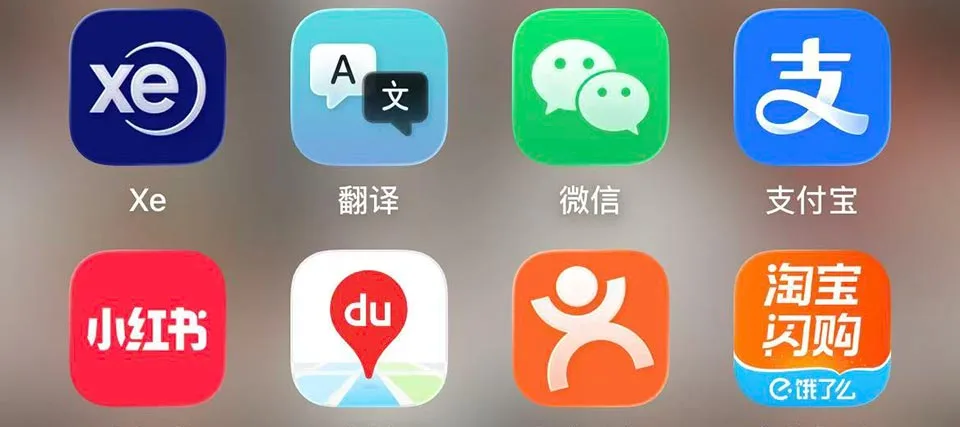
Let’s talk about daily life.
Cash is nearly obsolete in major Chinese cities. You will use Alipay or WeChat Pay for almost everything, from luxury malls to street food stalls. Link your international credit card and complete passport verification before departure.
If you already have a local Chinese sim card, Wechat can also cover most of your daily needs in China including Didi, Meituan, flight tickets and train tickets booking.
For trains, the official 12306 app exists but can be painfully complex for foreigners. We strongly recommend booking high-speed rail through Trip.com instead. It’s English-friendly, supports international cards and PayPal, and your passport becomes your ticket.
Ride-hailing via Didi works well with roaming or eSIM data. Having a +86 number helps if drivers need to call you.
Navigation? Google Maps is unreliable due to coordinate system differences. iPhone users are fortunate, Apple Maps automatically switches to local data from Gaode (Amap) while maintaining an English interface, and it works without a VPN. Android users may need to rely on translated local apps.
For email, Gmail is blocked. If you won’t use roaming or eSIM, consider auto-forwarding to Outlook or Yahoo before departure.
| Translation | Pleco Chinese Dictionary, Baidu Translate, Youdao, Hi Translate |
| Maps | Amap, Baidu Maps |
| Payment | WeChat, Alipay |
| Transport | Didi (like Uber), China Metro (public transport) |
| Travel bookings | Ctrip, Trip, Meituan |
| Food delivery | Meituan, Ele.me (China’s equivalent of Uber Eats and Yelp) |
Options Summary
| Option | Pros | Cons |
|---|---|---|
| International Roaming on Your Existing Sim |
|
|
| Travel eSIM (e.g., Airalo, Holafly) |
|
|
| Local Physical SIM (China Unicom/China Mobile) |
|
|
The Strategy We Recommend

If you want confidence, resilience, and flexibility, we strongly suggest what we call the “Resilient Duo” strategy. Use an eSIM (like Saily or Holafly) as your primary data connection. This keeps Google, Instagram, WhatsApp, and Gmail working smoothly. Then purchase a short-term local SIM at the airport solely for the +86 number.This dual-layer setup ensures:
- You can access global apps.
- You can receive Chinese SMS verifications.
- Didi drivers can call you.
- Food delivery works.
- Payments function smoothly.
It’s not about overcomplicating your setup—it’s about removing stress from your trip.
Where to Buy a Local Sim?
Purchasing a local SIM card at major Chinese airports is a convenient way to secure a +86 phone number for local apps. Most official telecom kiosks are located in the arrival halls and require your passport for mandatory real-name registration.
Here is a summary of where to find registration counters at these major hubs:
| Airport | Location Highlights |
|---|---|
| Beijing (PEK) | T2: China Mobile (Gate 7, 1st Floor). T3: China Mobile/Unicom (Baggage Carousel 38). 24/7: FamilyMart (T3, Level 1). |
| Shanghai (PVG) | T1: One-Stop Service Station (Gate 9). T2: One-Stop Service (Gate 2A) or kiosks opposite luggage belt 28. |
| Guangzhou (CAN) | T1: China Mobile (Gate 6) and China Unicom (Gate 7). T2: China Telecom near Gate 1. |
| Xi’an (XIY) | T3: China Telecom “One-Stop Service Center” near domestic arrivals (look for English signage). |
| Chengdu (TFU/CTU) | TFU (T1): Overseas Visitors Payment Service Center (offers 7, 15, and 30-day tourist SIMs). CTU: Dedicated counters in the arrival hall. |
*The information is based on Jan 2026 online research. Please visit the relevant airport’s website to verify the latest information.
Important Tips for the Airport
- Cash is Recommended: While some kiosks accept international credit cards, many are cash-only (RMB) or require local mobile payment, so it is wise to have roughly 150–200 RMB ready.
- Activation: Ensure the staff activates the SIM and tests the data connection on your phone before you leave the counter.
- Unlocked Phone: Your device must be network-unlocked to accept a Chinese SIM card.
Final Thoughts: Preparation Is Freedom
China in 2026 is vibrant, technologically advanced, and incredibly welcoming. Visa-free policies are expanding. Tourist SIM packages are improving. But the digital boundaries remain firm.
The biggest mistake travelers make is assuming they’ll “figure it out when they arrive.” Please don’t do that to yourself.
Download all essential apps before departure: WeChat, Alipay, Didi, Trip.com, your chosen eSIM app, and at least one VPN if needed. Complete identity verifications in advance. Test everything.
When you prepare digitally with the same care you give your itinerary, you transform the experience. Instead of battling connectivity, you’ll be standing on the Bund at sunset, navigating effortlessly, paying seamlessly, messaging family, and fully immersed in one of the world’s most fascinating countries.
The most powerful tool you carry isn’t your passport or your phone. It’s your preparation. Travel wisely and China will open beautifully for you.
About the author



 Joy was an absolute Joy