

By 2026, the reliance on mobile wallets like Alipay has moved from being a convenience to a total necessity for daily life, especially when it comes to getting around. While there are several platforms available, Alipay stands out for international travelers because of its robust English interface and its relatively seamless integration with foreign-issued bank cards. This guide takes you through every step of using Alipay for Bus, Metro, Taxi, Train, and Bike services.
Before diving into the specific transport features, it is vital that you have your account fully set up and verified. If you haven’t done this yet, you should refer to this comprehensive step-by-step guide on how to register and bind your card on Alipay, which covers the initial technical hurdles. Once your card is linked, you’re ready to master the local transit systems. You can explore the city by taking the bus, get around the city by metro, enjoy seamless travel with ride-hailing service, book high-speed train travel, and cruise the city by hopping on a shared bike.
Guide 1: Mastering the Urban Bus System
The bus network is often the most cost-effective way to explore a city, but it can be intimidating for newcomers. With Alipay, you don’t need to worry about having the exact change in coins. Here is exactly how to set up and use your digital bus pass based on the latest interface.
STEP 1: Accessing the Transport Hub
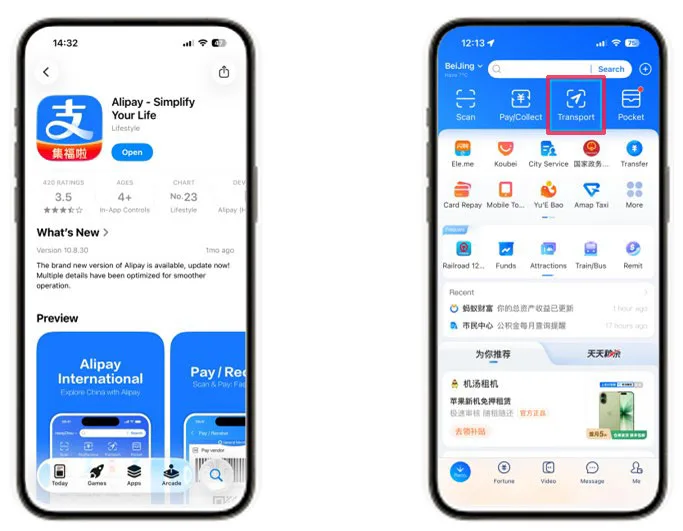
(Screenshot: Alipay Home screen with the “Transport” icon highlighted)
Open your Alipay app and on your Alipay home screen, look for the “Transport” icon in the top-row menu. It usually features a small bus or train symbol. If you don’t see it immediately, you can simply type “Transport” into the search bar at the top of the app.
STEP 2: Selecting Your City
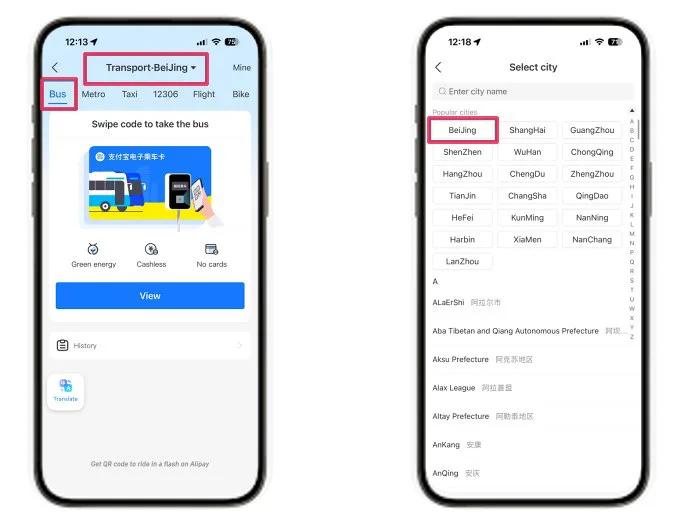
(Screenshot: The “Select City” menu with Beijing selected)
Once you are in the Transport section, look at the top-left corner. It is critical that this displays the city you are currently in (e.g., “Beijing” or “Shanghai”). If the city is incorrect, tap the name to open the “Select City” list. You can scroll through popular cities or use the search bar to find your specific location.
STEP 3: Activating Your Bus Code
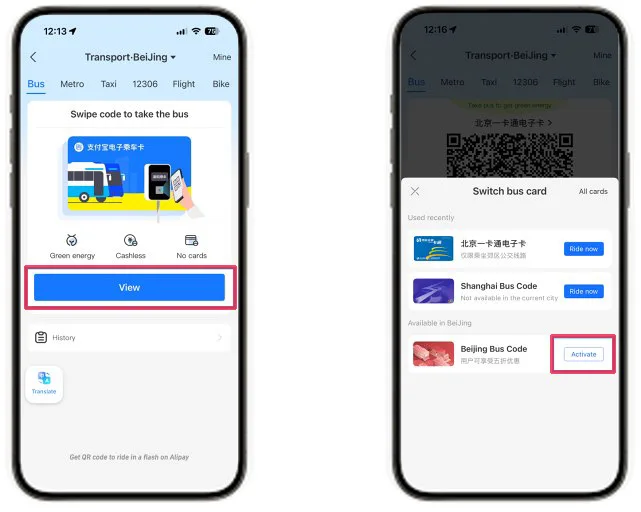
(Screenshot: The Beijing Bus Code activation page with the “View” and “Activate” button)
Ensure the “Bus” tab is selected at the top of the screen. You will see a prompt to “Swipe code to take the bus.” If you haven’t used the bus in this city before, tap the blue “View” or “Activate” button to start the setup for that specific municipality’s bus card.
STEP 4: Terms and Security Authorization
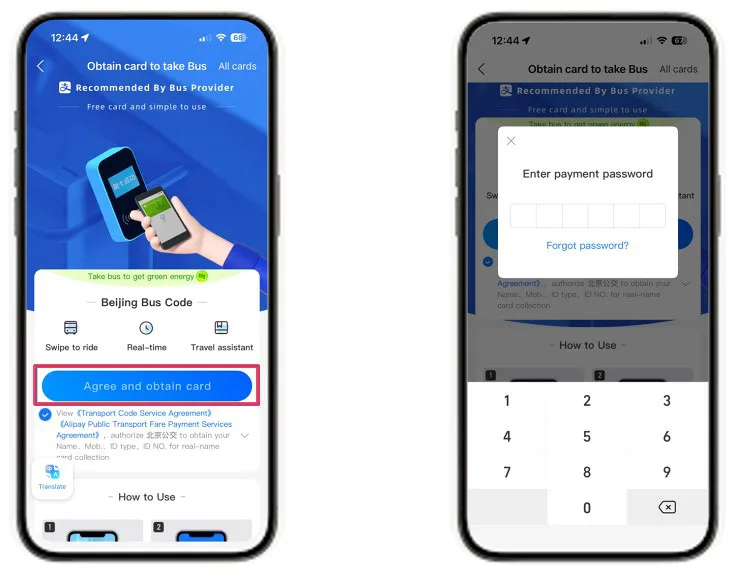
(Screenshot: The Agreement screen and the 6-digit payment PIN popup)
You will be presented with an “Obtain card to take Bus” screen. You must tap the “Agree and obtain card” button, which authorizes the system to automatically deduct fares from your linked international card.
To finalize this, Alipay will prompt you to enter your 6-digit payment password.
STEP 5: Using the Code to Ride
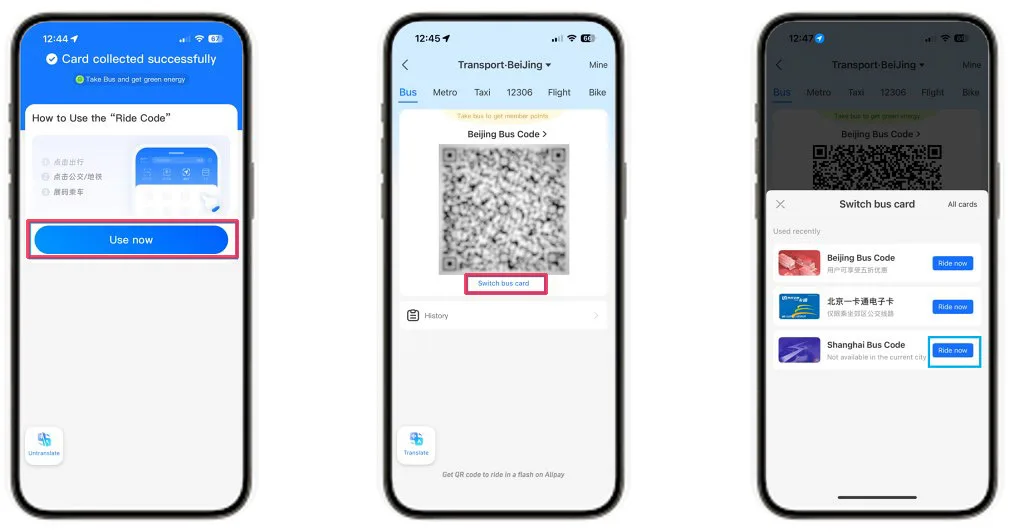
(Screenshot: The “Select City” menu and the “Switch bus card” menu showing cards for different cities)
Once activated, your unique Beijing Bus Code (or the code for your specific city) will appear on the screen.
Switching Feature: If you have previously activated cards in different cities (for example, you visited Beijing last week and are now in Shanghai), Alipay makes it easy to switch. By tapping “Switch bus card” directly under your current QR code, you can see a list of “Used recently” cards. You can simply tap “Ride now” to instantly toggle back to a previous city’s card without repeating the entire setup process.
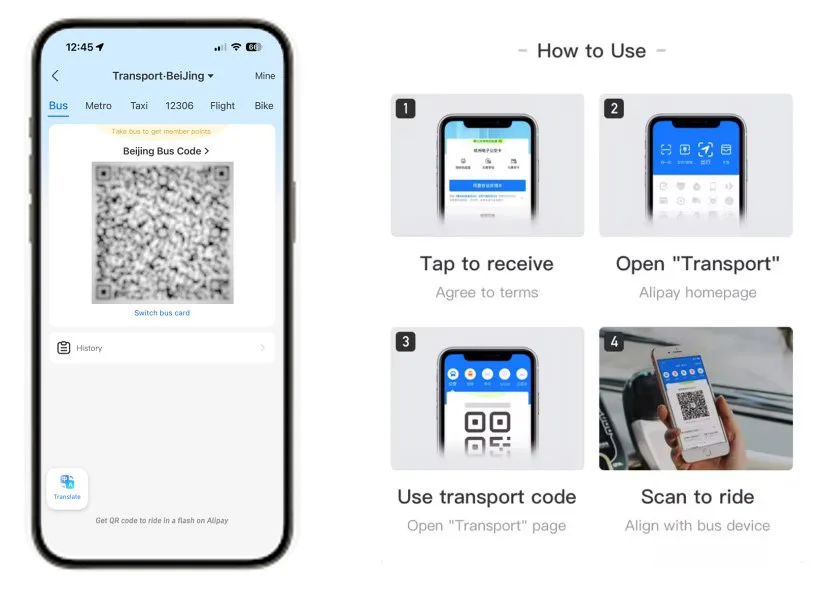
(Screenshot: The active Bus QR Code and an infographic showing how to align it with the bus scanner)
When you board the bus, simply align this QR code with the scanner located near the driver or the door. The scanner will usually chirp or chime to confirm a successful scan. Remember, in many cities, you only scan when boarding, but if the bus has scanners at both the front and rear doors, you may need to scan again when exiting to calculate a distance-based fare.
Guide 2: Mastering the Metropolitan Metro
The metro is the fastest way to bypass gridlock in cities like Beijing and Shanghai. Unlike the bus, which often has a flat fare, the metro is distance-based, meaning you must scan both in and out.
STEP 1: Locate the Transport Hub, Switch to the Metro Tab and Activate the Metro Code
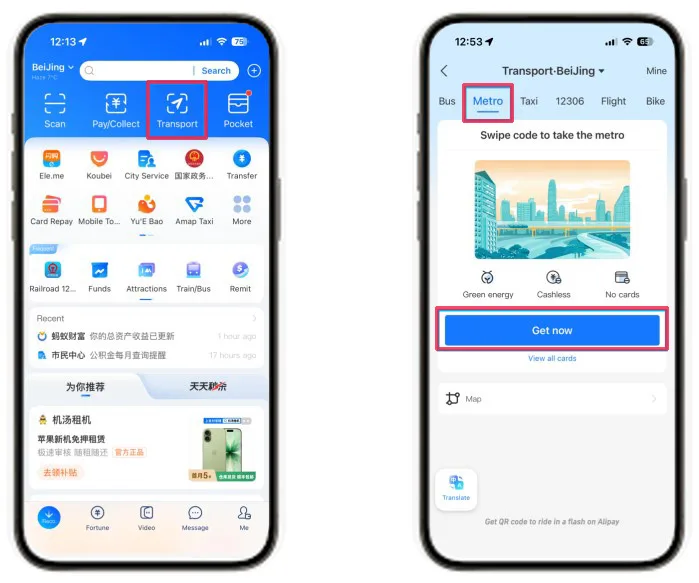
(Screenshot: The Metro activation screen with the “Get now” button highlighted)
Inside the transport page, look at the top menu and select the “Metro” tab. Just like the bus, you must check the city at the top. If you’ve just arrived from another city, tap the city name to update your location.
Under the “Swipe code to take the metro” prompt, tap the blue “Get now” button. This will initiate the activation for that city’s specific subway system.
STEP 2: Authorization and PIN Entry
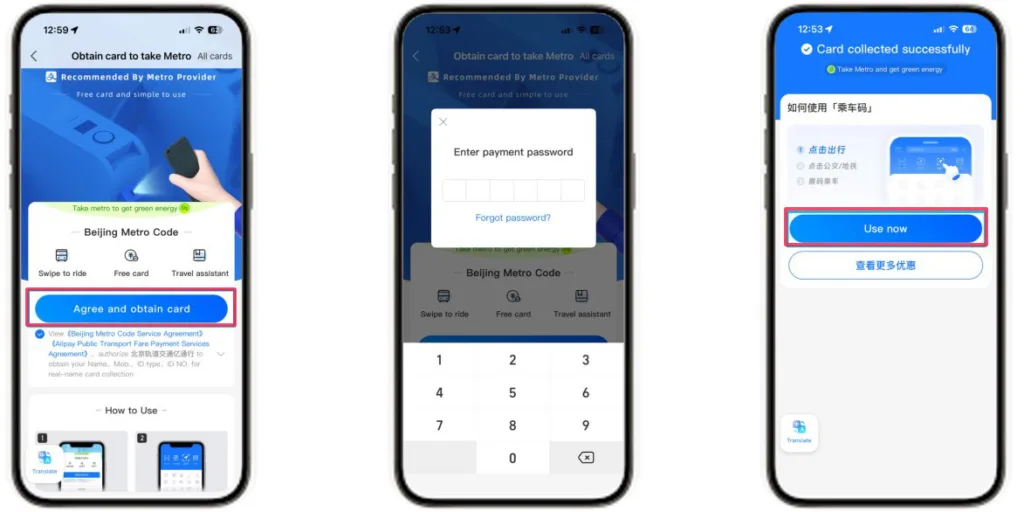
(Screenshot: The Metro agreement page, the 6-digit PIN entry popup and the “Use now” button highlighted)
Tap “Agree and obtain card” on the terms page. You will be prompted to enter your 6-digit Alipay payment PIN. This authorizes the “Post-Payment” service where the metro bureau will charge your linked international card after you complete your journey
Once the card is collected successfully, tap “Use now” to display your dynamic QR code.
STEP 3: Scanning at the Gate
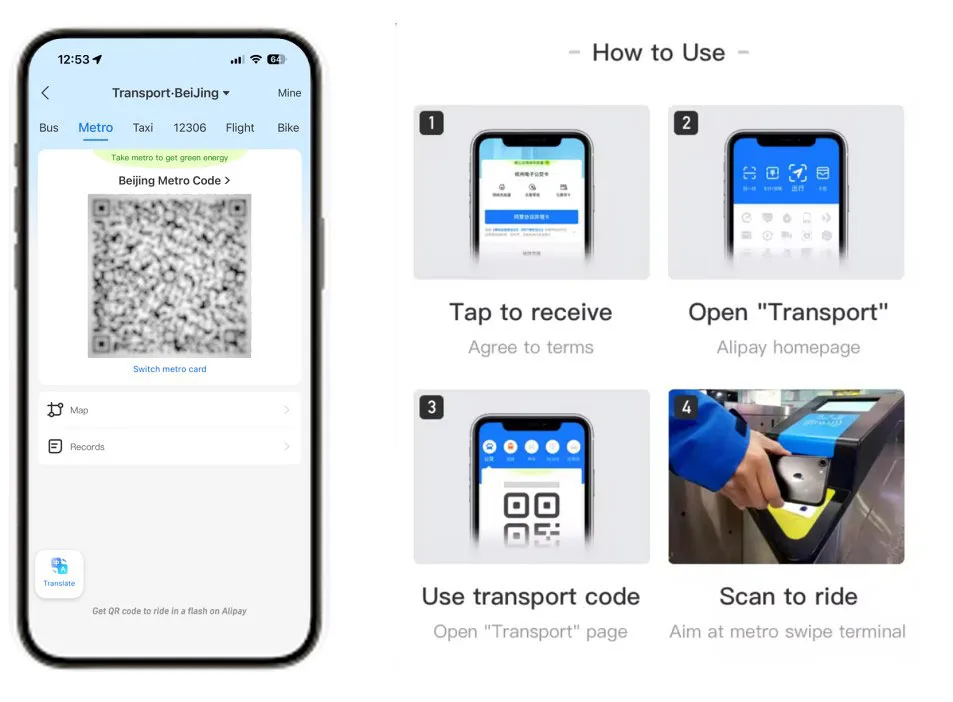
(Screenshot: The active Beijing Metro Code and the “Scan to ride” infographic for subway terminals)
At the subway station, aim your screen at the scanner on the turnstile (usually marked with a blue or yellow light). Tip: You must scan the code to enter the gates and scan the same code again to exit at your destination.
Guide 3: Seamless Ride-Hailing: The Didi Mini-Program
For trips where the bus or metro isn’t convenient, Didi is the ubiquitous equivalent of Uber. We recommend travelers use the Didi mini-program inside Alipay because it bypasses the need for a mainland Chinese phone number, a major hurdle for most travelers.
STEP 1: Initial Setup and Permissions
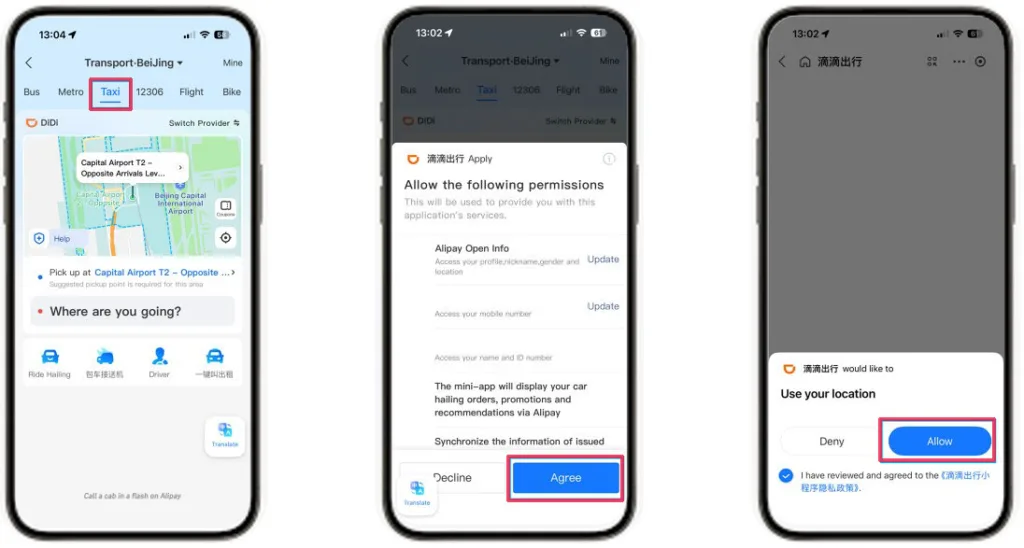
(Screenshot: The “Taxi” tab interface and the permission popups for Didi)
Inside the “Transport” hub, tap the “Taxi” tab. Since Didi is a third-party service, you’ll need to grant a few permissions the first time you use it. Tap “Agree” to allow Didi to access your Alipay info (like your name and mobile number) and select “Allow” when prompted for location access so the driver can find you.
STEP 2. Setting Your Destination
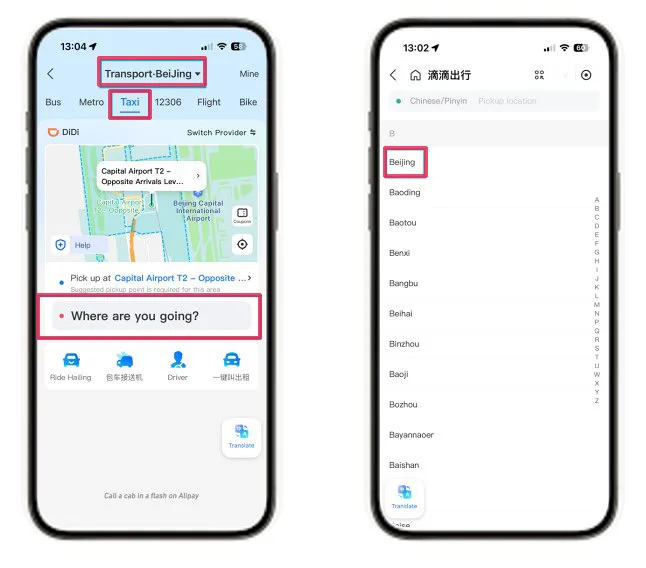
(Screenshot: The city selection list and the destination entry screen)
If you aren’t in the correct city, tap the city name at the top to select from the list of popular hubs like Beijing or Shanghai. Tap the box that says “Where are you going?”. You can enter your destination in English, and the app is quite good at finding major landmarks or hotels.
STEP 3: Confirming Pickup and Ride Type
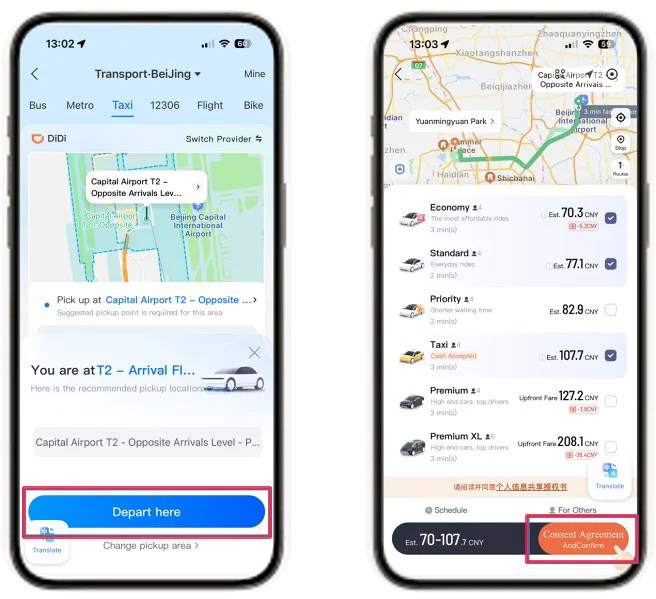
(Screenshot: The map confirmation and the ride selection menu)
Check the map to ensure your pickup point (the blue dot) is accurate. Tap “Depart here” once your location is set. You will then see a list of vehicle tiers:
- Economy/Standard: Great for budget-friendly solo travel.
- Priority/Taxi: Faster response times or traditional metered cabs.
- Premium: High-end cars for business or comfort.
Select your preferred tier and tap the orange “Consent Agreement and Confirm” button.
STEP 4: Managing Your Ride
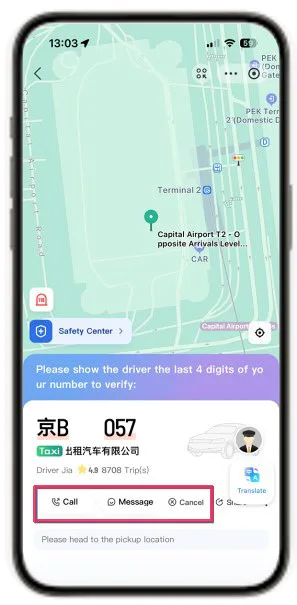
(Screenshot: The active ride screen with license plate, driver details, and “Message/Call” buttons)
Once a driver accepts, you’ll see their license plate number and estimated arrival time. Tip: If you need to contact the driver, use the “Message” button. The app has a built-in translation tool, so you can type in English and they will receive it in Chinese. When the car arrives, the driver might ask for the last four digits of your phone number to verify the booking. Payment is automatic once the ride ends, so you can just step out and go.
Guide 4: How to Book and Take High-Speed Rail (12306)
China’s High-Speed Rail (HSR) network is world-class, offering a level of connectivity and comfort that makes it the premier choice for domestic travel. If you are looking to explore nearby cities, the fast speed train is an exceptional option; routes like Beijing to Tianjin or Shanghai to Hangzhou are so efficient they effectively turn these destinations into day-trip suburbs.
To book your tickets, the official “Railway 12306” mini-program within Alipay remains the only platform that gives you direct access to the national rail system’s inventory without the extra service fees or markups charged by third-party agents.
STEP 1: Searching for Tickets
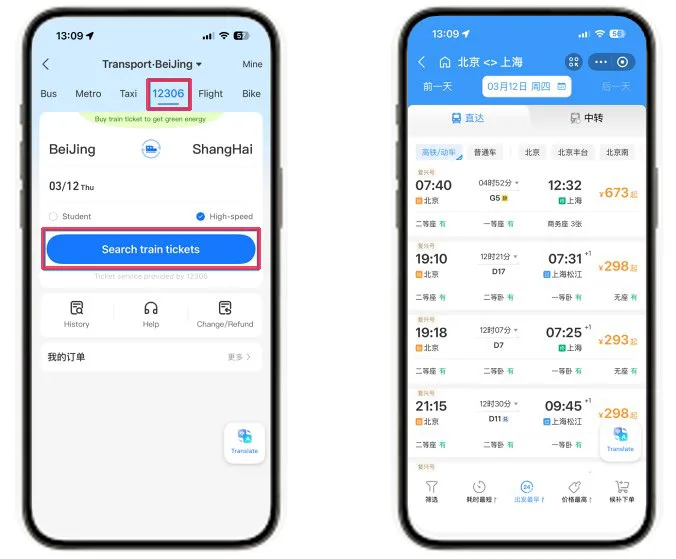
(Screenshot: The 12306 search interface and the results page showing different train types)
Inside the “Transport” hub, select the “12306” tab. Enter your departure city, destination, and travel date. For high-speed travel, ensure “High-speed” is checked to filter for “G” or “D” trains. Tap “Search train tickets” to view a list of available times, durations, and prices (e.g., Second Class, First Class).
STEP 2: Authorization and Identity Verification
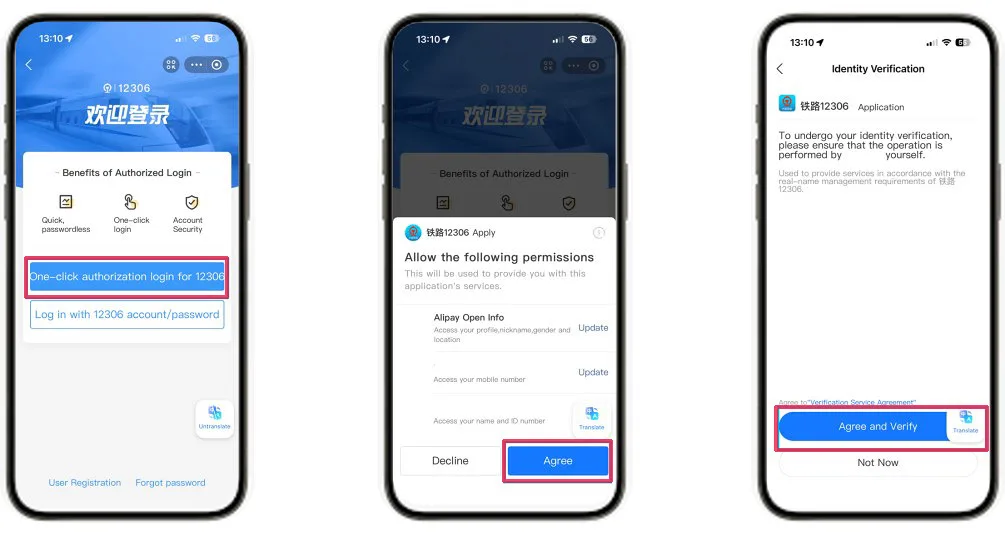
(Screenshot: The 12306 Login screen and the Identity Verification permission popup)
When you select a train, you’ll be prompted to log in. Use the “One-click authorization login for 12306” for a seamless experience. You must then tap “Agree” to allow permissions and “Agree and Verify” to initiate the mandatory “Real-Name” identity check.
STEP 3: Adding Passenger Information
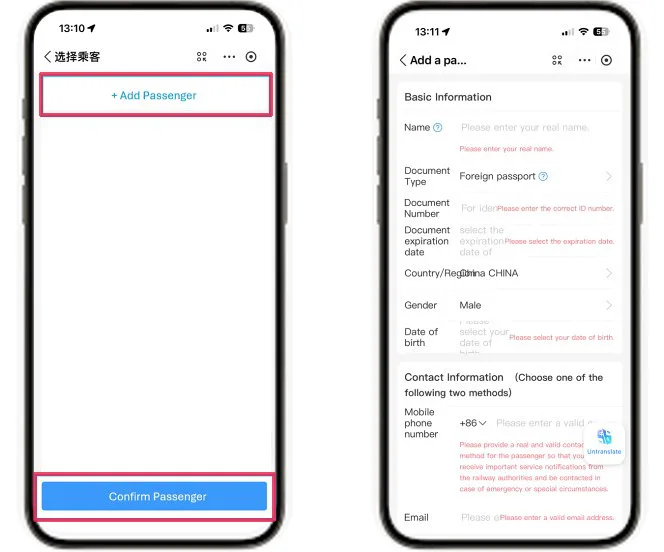
(Screenshot: The “Add a Passenger” form and the passenger selection list)
Before booking, you must add yourself as a passenger. Tap “+ Add Passenger” and enter your details exactly as they appear on your passport: full name, “Foreign passport” as the document type, passport number, and expiration date. Once the fields are filled, tap “Confirm Passenger”.
STEP 4: Selecting Seats and Submitting the Order
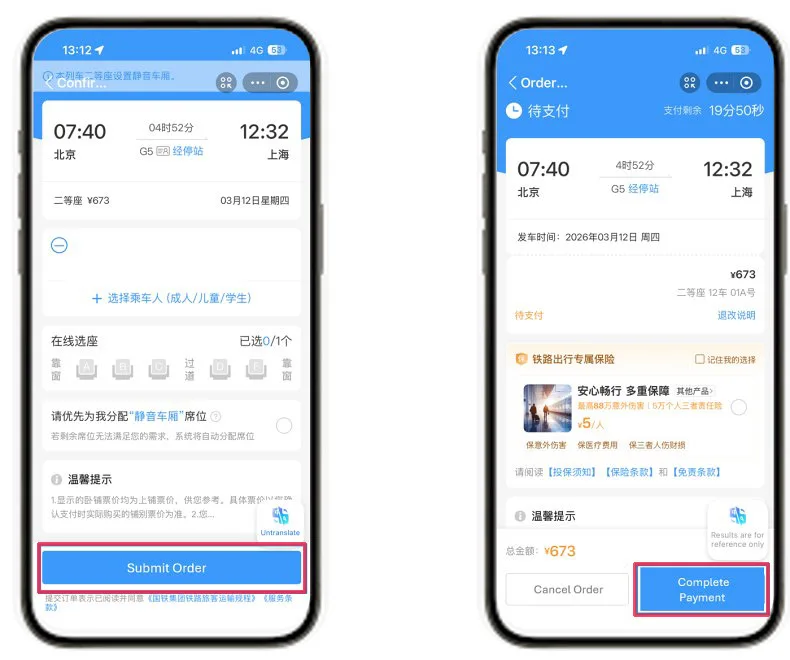
(Screenshot: The “Confirm Order” screen with the seat selection layout)
Choose your seat class and use the seat selection map to pick your preferred spot (A and F are windows; C and D are aisles). Review the final train details and tap “Submit Order”. You have roughly 15-20 minutes to complete the transaction. Tap “Complete Payment” to authorize the fare.
STEP 5: Boarding
Your passport is your ticket. At the railway station, proceed to the “Manual Lane” at the gate. The attendant will scan your physical passport to confirm your digital booking—no paper ticket is required.
Guide 5: Micro-Mobility and Shared Bicycles
When you only have a short distance to cover or simply want to catch a breeze while exploring a wonderful new city, China’s shared bike system is a lifesaver. By 2026, the sky-blue Hellobikes have become the most reliable and convenient option for international travelers using the Alipay ecosystem.
STEP 1: Accessing the Bike Map
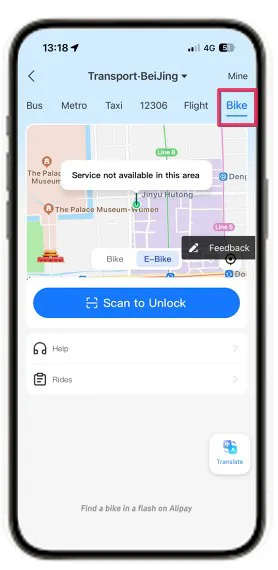
(Screenshot: The Bike tab showing the map, “Scan to Unlock” button, and the “Service not available” warning)
Within the “Transport” hub, select the “Bike” tab. A map will appear showing available bikes nearby. Pro Tip: As seen in the screenshot, if you see a message saying “Service not available in this area,” you are likely in a restricted pedestrian zone (like the Forbidden City area shown) where bike parking is prohibited. You must walk to an area where the map markers appear before you can start a ride.
STEP 2. Choosing Your Vehicle
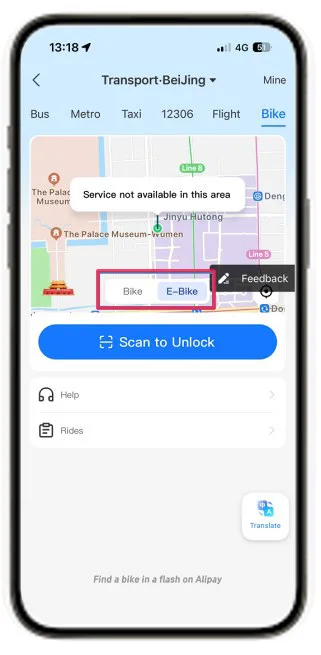
You can toggle between a standard “Bike” and an “E-Bike” (if available in your city) using the selector above the scan button. E-bikes carry a higher fee but are great for hilly areas.
STEP 3: Scanning to Unlock
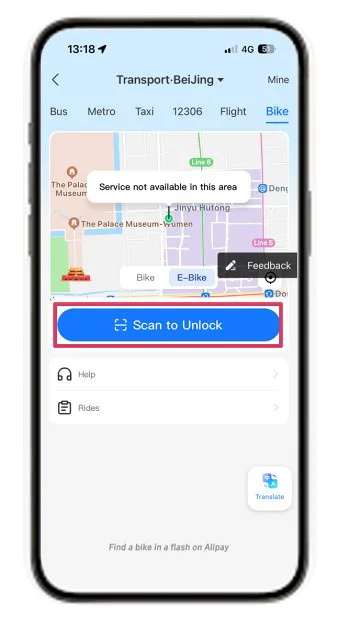
Tap the large blue “Scan to Unlock” button and point your camera at the QR code located on the bike’s handlebars or under the rear of the seat. You should hear the lock click open via Bluetooth within seconds.
STEP 4: The 60-Second Quality Check
After unlocking, check the brakes and pedals immediately. If the bike is faulty, relocking it within one minute usually ensures you are not charged. You can use the “Help” or “Feedback” buttons in the app to report the issue.
STEP 5. Mandatory “P-Zone” Parking
The most important rule to remember is the “P-Zone” requirement. You must park in designated zones marked with a blue “P” on your app map. If you try to end your ride outside these zones, the app may prevent the lock from closing, and you could be charged a penalty fee of 5 to 20 RMB. Once safely in a P-zone, manually slide the lever on the rear wheel down and confirm the trip is finished in the app.
Embrace the Journey
Mastering the digital landscape of China’s transport system is the final piece of the puzzle for a truly immersive trip. The friction of travel has vanished, replaced by a world of instant connections and effortless movement. From the silent hum of the high-speed G-trains to the simple click of a Hellobike lock, the technology is there to serve your curiosity.
We hope this guide empowers you to step outside the typical tourist bubbles and explore the vibrant, fast-paced, and historic corners of mainland China with ease. Remember to keep your passport handy, your phone charged, and your sense of wonder wide open. China is an incredible place that rewards the prepared traveler, and with Alipay in your pocket, you’re more than ready.
* While linking your overseas bank card to Alipay app, additional bank service charge may rise. Before your trip, remember to inform your local bank of your travel plan. Also comparing the bank service charges to select a better one to link your Alipay app.
About the author



 Only way to travel in China with China Tours